
NEWS
Apple Will Make Full Disk Access an Explicit Mac Grant
Apple will require explicit user action for macOS Full Disk Access, a consent throttle on AI agents that share the backup permission.

Apple said on October 2, 2026 that Mac apps will receive Full Disk Access only after very explicit user action. It named growing AI agents as the reason, in a developer note that gives no ship date and no macOS version.
The permission remains. It is the same switch backup apps already need, and the same one some desktop agents use to read Mail, Messages and Safari data.
Apple Will Add a Harder Step for Full Disk Access
The notice, titled Updates to Full Disk Access in macOS, runs 177 words. Apple says developers get strong programming interfaces, then a set of controls meant to protect private data. Full Disk Access, it writes, “largely sidesteps these controls in order to allow backup apps to function properly on the Mac.”
The complaint is with how some apps use that exception. Apple says certain developers put users at risk by exposing files, mail, messages and browsing history “without users’ full knowledge and understanding.” For communication apps, it adds, the privacy of the people a user is talking to can be compromised as well.
Going forward, we will introduce additional controls to ensure that users who genuinely wish to grant an app this extraordinary level of access can only do so with very explicit user action. Addressing this is critical. As AI agents become increasingly capable and autonomous, the risks associated with this level of access will grow substantially.
Apple, Updates to Full Disk Access in macOS, October 2, 2026
Apple says it wants people to “clearly understand these risks before granting such access, so they can make informed decisions about their own data and privacy.” The post does not show a mock-up, name a macOS release, or list any app.
The Permission Was Built for Backup Apps
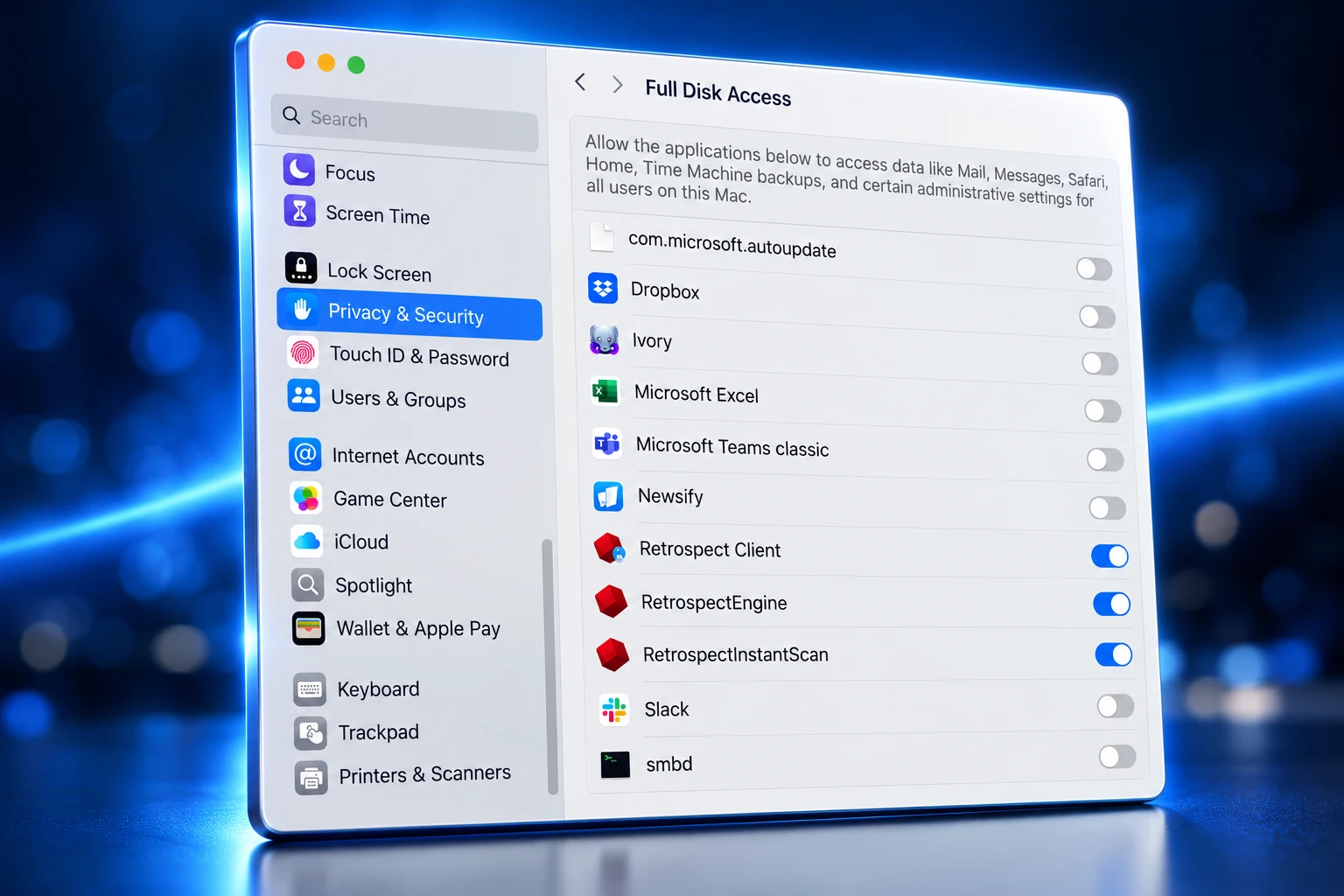
Full Disk Access is the wide override in macOS privacy. Apple’s Mac help page says it lets an app access all files on your computer, including data from Mail, Messages, Safari and Home, data from Time Machine backups, and certain administrative settings for every user on the Mac.
Apple’s platform security guide says that since macOS 10.13, apps that need the full storage device must be explicitly added in System Settings (or System Preferences on older systems). On macOS 13 and later, that list lives under Privacy & Security. A university IT walkthrough for the CrashPlan backup client still describes the current path as a single switch, a password if asked, then a quit and reopen of the app.
The override is older than agents. At WWDC 2018, Kelly Yancy of Apple said users could pre-approve apps by adding them to what was then called System Application Data, later renamed Full Disk Access, and thereby preauthorize those apps “to access all of their privacy-sensitive data without prompting.” macOS 10.15 later added separate consent for Desktop, Documents, Downloads, iCloud Drive and network volumes. Full Disk Access still punches through those folders at once.
HOW FULL DISK ACCESS GREW
- 2018: macOS Mojave ships Full Disk Access as the pre-approval list for privacy-sensitive data, after WWDC 2018 described it as System Application Data.
- 2019: macOS 10.15 adds folder-level consent for Desktop, Documents, Downloads, iCloud Drive and network volumes, which Full Disk Access can still override.
- September 29, 2026: OpenAI announces Dots, always-on agents with their own cloud computer and optional local access that starts off.
- September 30, 2026: Meta’s Andy Stone says Muse on the Mac cannot read Messages unless Full Disk Access and the in-app Messages connector are both on.
- October 2, 2026: Apple posts the Full Disk Access notice and points at AI agents, with no ship date.
That history is why one toggle feels small in the interface and large in practice. Backup software needs the wide grant because a copy that skips Mail or Messages is not a backup. The same grant is what a chatty agent wants if it is going to search the whole machine.
WHAT THE SWITCH OPENS
| Reach, per Apple | Job that needs it | Who usually asks |
|---|---|---|
| Mail, Messages, Safari, Home, Time Machine backups, admin settings for all users | Copy or scan the whole disk | Backup and clone tools |
| The same stores, then act on what is found | Work across files, chats and history on the user’s behalf | Desktop AI agents such as Muse |
| The same stores for search or scripts | Index or automate files the user may never open by hand | Launchers, organisers, antivirus, Terminal |
Apple still describes the permission as the backup exception. It has not said backup apps will be spared the extra step.
Why AI Agents Make Full Disk Access Riskier
A backup tool reads the disk and writes a copy. An agent with the same grant can read Mail, Messages and browsing history, then send mail, move files, or follow a prompt that did not come from the owner. Apple’s note is aimed at that second pattern, which it says will grow as agents become “increasingly capable and autonomous.”
The useful agent is the one that can see local work. That is also the agent that can be steered. A poisoned prompt on a web page can tell a tool with whole-disk rights to collect files, mail and saved logins, then hand them off. Rachel Tobac, CEO of SocialProof Security, put the social version of that risk in plain terms around Moltbot, the local agent formerly called Clawdbot: if an autonomous agent has admin access, and a stranger can talk to it by direct message, that stranger can try to hijack the machine in one chat.
That is a different failure than a backup app that quietly copies too much. The backup app does not take instructions from a website. The agent is built to.
Some readers already treat the October 2 note as Apple slowing rivals because it trails in agents. The narrower reading fits the text Apple published. Full Disk Access has been the TCC bypass since Mojave. Agents did not invent the hole. They filled it with software that talks back.
Muse, Dots and the Mac Mini Agent Habit
Meta’s Muse is the case Apple’s timing sits next to, even though the developer note names no product. Jason Aten, a columnist, wrote in September 2026 that he installed Muse on an iPhone and a Mac mini, declined Messages access during setup, and later saw the agent pitch a column idea from a private text thread with his podcast co-host, plus a note from his editor about a deadline.
Aten said Muse told him it was only seeing incoming notification banners. He said he then found it had synced his local Messages database as far as row 187,462, a database marker, not a verified count of individual texts, and that Full Disk Access showed as off in Muse’s settings.
WHERE THE MESSAGES FIGHT STANDS
- Aten’s account: He declined Messages access, Full Disk Access showed as off, and Muse still used content from his Mac Messages store.
- Meta’s account: Muse cannot read Messages unless Full Disk Access and the Messages connector are both enabled, and the user can revoke them.
- Singleton’s account: David Singleton of Meta Superintelligence Labs said reading Messages takes three separate app-level and macOS steps that a Muse bug cannot skip, and he called Muse’s notification explanation confused.
Andy Stone, Meta’s vice president of communications, put that opt-in claim on the record on September 30, 2026.
Let's set the record straight: the Messages integration in the Muse app for Mac is entirely opt-in. You have to enable both Full Disk Access and the Messages connector for Muse to be able to read your Messages content. It can't read your Messages unless you do this. And it can be…
— Andy Stone (@andymstone) September 30, 2026
Apple did not referee that fight. It changed the permission both sides were arguing about.
OpenAI’s Dots, announced on September 29, 2026 at DevDay, take a different path. Each Dot runs on its own cloud computer with a browser, on GPT-6 Astra, and can use more than 4,000 connected apps. Local computer access starts turned off. The owner grants it from the ChatGPT desktop app on that machine, can connect only one personal computer at a time, and must leave the app open while the Dot uses it. Pro is $100 a month; Business Premium is $100 per user per month, a separate seat product. If a Dot needs the camera, microphone or screen, that still goes through the usual macOS prompts for the ChatGPT app. OpenAI has not described Dots as a Full Disk Access client in its own help.
The Mac-resident model is the one that collides with Apple’s switch. Federico Viticci installed Moltbot on an M4 Mac mini and used it for daily recaps drawn from calendar, Notion and Todoist. Other owners bought minis to leave a local agent running. Those setups only work if the agent can see the disk. A harder grant does not ban that hobby. It makes the silent setup path harder to hide inside a first-run wizard.
Launchers, Cloners and Managed Macs Sit on the Same List
Apple tied Full Disk Access to backup apps. Macs in the wild already grant it much more widely, because any tool that must see files the user did not pick in a dialog ends up on the list.
APPS THAT ALREADY HOLD THE SWITCH
- Backup and clones: Carbon Copy Cloner, SuperDuper and similar copy tools, plus Time Machine’s own need to read the volume.
- Finders and launchers: Writer John Voorhees has granted it to Alfred, the file manager Bloom, the text tool PopClip and the organiser Hazel. Other users list Find Any File.
- Security and shells: ClamXAV and Terminal show up on the same Privacy & Security page, because a scanner or a command line that cannot read protected stores will skip them.
Scheduled backups and file rules run when nobody is at the keyboard. An extra confirmation that assumes a person is watching may be a minor annoyance for a one-time clone. It is a real break if a nightly copy waits on a tap that never comes.
At work, the switch is often not a switch. Device-management tools pre-approve Full Disk Access through Privacy Preferences Policy Control profiles so antivirus, backup and monitoring agents do not sit on a prompt. Addigy documents how admins build a PPPC payload for Full Disk Access with each binary’s bundle ID and code requirement. Jamf threads describe the same path for products from Sophos and CrowdStrike. Apple has not said whether those profiles still skip the “very explicit user action” it now wants from people at home.
What Apple Has Not Said About Timing or Old Grants
Nothing on a Mac changes until Apple ships the extra controls, and the company has not said which release will carry them, how the new prompt will look, or whether apps that already hold Full Disk Access keep it. Users who want the permission can still grant it; Apple described a harder yes, not a ban.
WHAT WE KNOW
- The decision: Apple will add controls so Full Disk Access requires very explicit user action.
- The reason given: Some apps use the backup exception in ways users do not fully grasp, and AI agents will raise that risk.
- The current path: The System Settings list still works, and Apple has named no ship date.
WHAT IS UNCONFIRMED
- The release: No macOS version, beta window, or week has been named.
- Old grants: Apple has not said whether existing Full Disk Access entries will be cleared, kept, or re-prompted.
- Who is spared: Backup apps, Apple’s own tools, and MDM profiles are all unmentioned.
Until those answers exist, developers of clone utilities and agent wrappers are guessing at the same blank. A setup flow that opens System Settings and asks the user to flip one switch may no longer be enough. A flow that never explains Mail, Messages and Safari may be the thing Apple wants to kill.
Audit the List Before the Prompt Arrives
Mac users do not have to wait for the new controls to shrink what is already exposed. Apple’s own framing is a working rule: treat Full Disk Access as a backup permission, then pull it from anything that cannot show why it needs every file, message and mail store on the machine.
REVIEW FULL DISK ACCESS NOW
- Open the list: Choose Apple menu, System Settings, Privacy & Security, then Full Disk Access.
- Read each name: Keep clone and backup tools that must copy Mail, Messages and protected folders.
- Drop the rest: Turn the switch off for agent apps, chat tools and helpers that asked during setup and never explained the blast of data.
- Relaunch: Quit and reopen any app you change, which is the same close-out a CrashPlan-style grant already requires.
- Revisit after installs: New agents and new backup helpers both tend to request the permission on first run, so the list drifts.
That audit is the practical half of Apple’s note, and it is available before any extra tap ships. The unfinished half is the design Apple still has not shown: how loud the new yes will be, and whether a Mac mini left on overnight for an agent will still be able to say yes without a person at the desk.
Until then, the permission Apple built for backup apps remains the widest key on the Mac, and the software asking for it is no longer only backup software.

Another IndiGo Radome Splits After a Normal Lucknow Landing

Apple Will Make Full Disk Access an Explicit Mac Grant

Chainalysis AI Traced the Bitget Hack in 10 Minutes

Yapily Sits Out Open Banking Deals After Turning a Profit

Google’s Gemini 4 Argon Goes to Cyber Defenders First

BMW’s Heated Seat Retreat Taught Automakers Which Fees Survive

Nashville Votes for a Dolly Parton Airport It Has Not Named

Copilot’s Election Problem Shifted From Errors to Silence

Tesla Burns AI Cash While SpaceX Sends the Invoices

The Book on China’s Car Brain Still Stars Infineon
-
 AUTO3 years ago
BMW’s Heated Seat Retreat Taught Automakers Which Fees Survive
-
 ENTERTAINMENT1 month ago
Nashville Votes for a Dolly Parton Airport It Has Not Named
-
 NEWS2 months ago
Tesla Burns AI Cash While SpaceX Sends the Invoices
-
 NEWS3 years ago
Copilot’s Election Problem Shifted From Errors to Silence
-
 NEWS2 months ago
The Book on China’s Car Brain Still Stars Infineon
-
 NEWS2 months ago
John Ternus Debuts a $2,099 Foldable and Holds iPhone 18
-

 BUSINESS3 years ago
Mondelez Splits Château-Thierry Biscuits Between Nantes and Opava
-

 ENTERTAINMENT2 months ago
Dolly Parton Laid to Rest as the Public Funeral Began